Product Overview
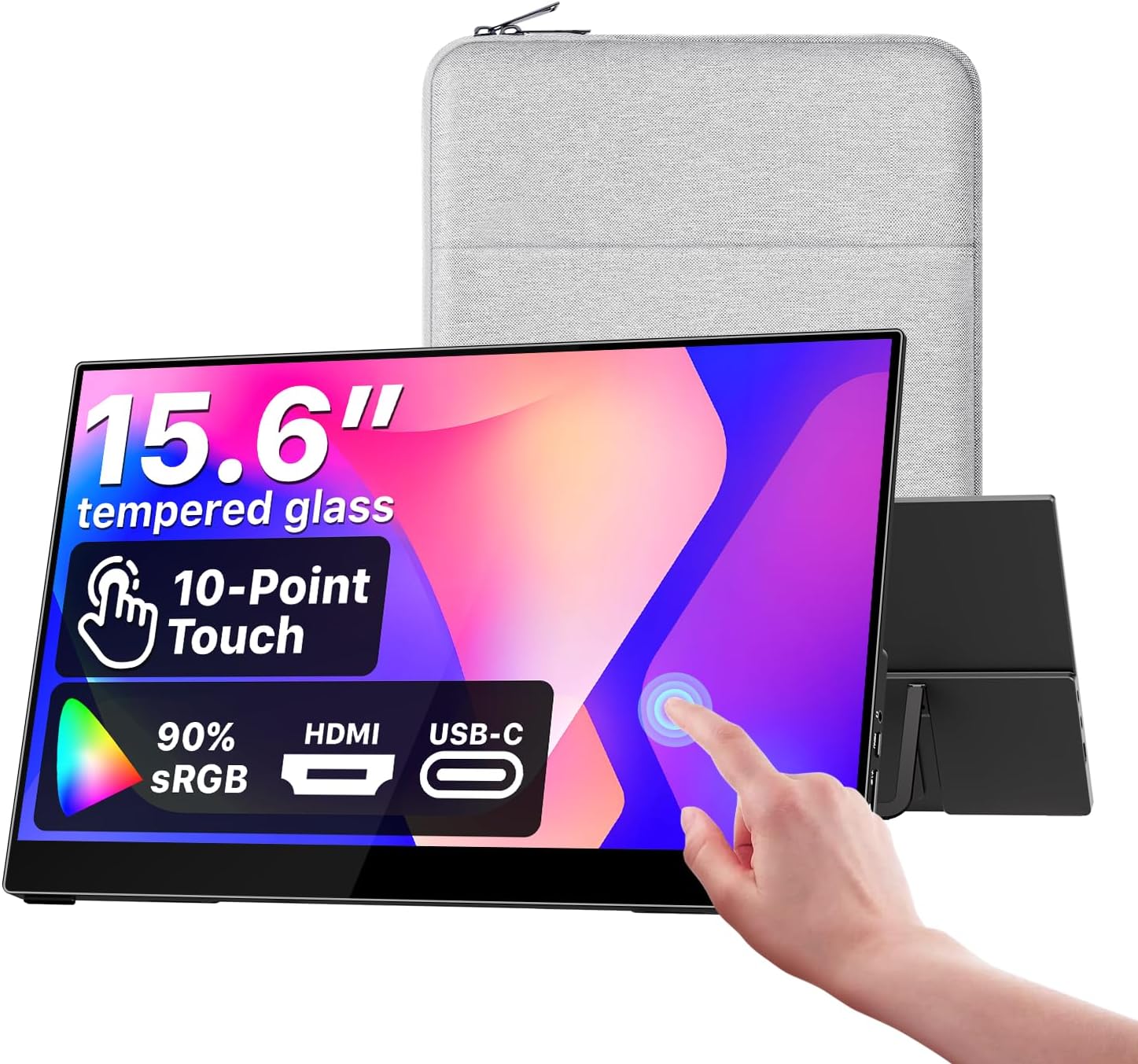
The cocopar Y156FH7LHT is a 15.6-inch portable touchscreen monitor designed to add a second display to a laptop, desktop computer, or compatible game console. Its core specification is a 1920×1080 Full HD IPS panel with a stated 90% sRGB color gamut, 270-nit brightness, and 178-degree viewing angles. The product title and manufacturer description also identify HDMI and USB-C connectivity, built-in speakers, an integrated adjustable kickstand, a metal frame, and a tempered-glass screen surface.
The monitor is positioned as a travel-friendly second screen rather than a high-resolution desktop replacement. Full HD at this size is suitable for documents, browser windows, messaging, presentations, coding panels, and general entertainment. The 16:9 aspect ratio also matches common laptop and console video formats, although the supplied information does not establish every console-specific setting or compatibility detail.
Its main appeal is flexibility. A compatible computer can use a single USB-C cable for power, video, and touch signals, while HDMI provides a conventional video connection for systems that do not support video over USB-C. When HDMI is used, the manufacturer does not state whether touch operates through a separate USB connection, so buyers should treat HDMI video and touchscreen functionality as separate compatibility questions.
The exact ASIN-to-model relationship should be understood with some caution. The manufacturer page matches the supplied product title, including the display size, touchscreen, resolution, color-gamut description, ports, speaker, VESA-mountable wording, and intended device categories. A separate specification record identifies the unit as model Y156FH7LHT and associates it with ASIN B0G4QHGL55, but the manufacturer page itself does not visibly show either the ASIN or model number.
For shoppers searching for a cocopar 15.6 inch portable monitor, the relevant decision is whether the combination of Full HD resolution, touch input, USB-C convenience, HDMI connectivity, and built-in stand fits their workflow. It is not appropriate to infer professional color accuracy, a particular touch technology, or a complete mounting specification from the available information.
Key Features and Specifications
Display and image characteristics
The monitor uses a 15.6-inch IPS panel with a native resolution of 1920×1080. That is a Full HD display in the familiar 16:9 format, giving it a practical layout for side-by-side applications and standard video content. The manufacturer states 90% sRGB color-gamut coverage, while the secondary specification record lists a 270-nit brightness level, 1000:1 contrast ratio, 60 Hz refresh rate, and 3 ms response time.
The manufacturer directly verifies the 90% sRGB, 270-nit, and 178-degree viewing-angle claims. The contrast, refresh-rate, response-time, and aspect-ratio details come from the secondary specification record for model Y156FH7LHT. The retrieved product data does not provide measured color accuracy, calibration information, HDR support, or a brightness-control range, so the display should not be presented as a color-critical monitor based only on these specifications.
The screen surface is described as tempered glass, and the secondary record lists a glossy finish. Glossy screens can present reflections depending on the room, window placement, and lighting, but the supplied evidence does not include an independent assessment of glare or outdoor readability. The manufacturer also describes the metal frame as helping with heat dissipation, though no thermal measurements are supplied.
Touch input
The touchscreen supports native touch gestures on macOS and Windows. The listed gestures include single-finger sliding, pinch-to-zoom, dragging, and dropping. That makes the monitor potentially useful for navigating a presentation, scrolling through documents, manipulating a timeline, or interacting with supported creative and productivity software.
The available product data does not identify the touchscreen technology or the number of simultaneous touch points. It also does not confirm whether touch works over HDMI without a separate USB connection. Those omissions matter because video transmission and touch-data transmission may use different connections in a multi-cable setup.
Connections and sound
The monitor has two USB-C ports and one standard HDMI port. The manufacturer states that a single USB-C cable can carry power, video, and touch signals without drivers when the host computer supports Thunderbolt 3, Thunderbolt 4, Thunderbolt 5, or USB-C DisplayPort Alt Mode. This is the clearest route to a simple laptop setup, but the computer’s USB-C port must support the required display function rather than only charging or data.
The product includes built-in speakers. Neither the manufacturer page nor the available supporting material states the speaker wattage, audio-output details, or volume-control behavior. Consequently, the speakers can be described as an integrated convenience feature, but their loudness and sound quality cannot be evaluated from the supplied evidence.
Physical design and included items
An integrated adjustable kickstand allows the monitor to stand independently at a chosen viewing angle. The manufacturer also describes a metal frame and a tempered-glass surface. The secondary record lists approximate dimensions of 0.23 inches deep by 13.95 inches wide by 8.8 inches high, with an approximate weight of 2 pounds.
The manufacturer states that the package includes a protective sleeve, power adapter, HDMI cable, and USB-C cables. The secondary record gives a more detailed inventory: an HDMI cable for video, one USB-C-to-USB-C cable for video, touch, and power, two USB-A-to-USB-C cables for touch and power, a sleeve case, a power adapter, and the monitor. Because package contents can vary by listing or production batch, buyers should verify the delivered package against the seller’s current listing.
How It Works
Single-cable USB-C operation
The most streamlined setup uses USB-C from a compatible host computer to the monitor. According to the manufacturer, one cable can carry power, video, and touch signals, so a suitable laptop may not need a separate power lead or touch cable. The host must support Thunderbolt 3, 4, or 5, or USB-C DisplayPort Alt Mode; a USB-C connector by itself does not guarantee display output.
This distinction is important for troubleshooting. If the monitor powers on but shows no image, the laptop’s port may support charging or ordinary USB data without supporting DisplayPort Alt Mode. The supplied evidence does not identify a universal adapter or workaround for such a port, so users should check the computer’s documentation before relying on single-cable operation.
HDMI and additional USB connections
HDMI provides a conventional way to send video from a compatible computer or console. The listed cables include one HDMI cable for video. The product data does not state whether HDMI carries audio in every supported setup, nor does it explain the exact USB wiring needed to enable touch while HDMI is being used.
The secondary package listing includes USB-A-to-USB-C cables for touch and power, suggesting that multi-cable configurations are part of the intended use. However, the retrieved sources do not provide a port-by-port connection diagram. Users connecting HDMI video should therefore consult the supplied instructions, if present, and confirm how the monitor’s USB-C ports are assigned.
Touch interaction and stand positioning
Once the host recognizes the display and touch connection, the manufacturer describes support for basic gestures such as sliding, pinch-to-zoom, dragging, and dropping on macOS and Windows. The adjustable kickstand then provides a way to position the display beside a laptop or in front of the user. The available data does not specify the stand’s angle range, locking mechanism, or stability on different surfaces.
The product title calls the monitor VESA mountable, but the retrieved manufacturer content does not state the VESA pattern, hole spacing, screw size, weight limit, or mounting instructions. It is therefore safer to regard VESA mounting as a claimed feature that requires verification before purchasing an arm, bracket, or stand.
Everyday Uses and Benefits
Laptop productivity
The most straightforward use is as a portable second screen for a laptop. A writer could keep source material on one display while drafting on the other; a developer could move documentation, logs, or a terminal to the external screen; and a remote worker could use the added panel for chat, calendars, or reference documents. The 15.6-inch Full HD format provides a familiar desktop workspace without requiring a full-size desktop monitor.
Touch input adds another interaction method for supported Windows and macOS workflows. Scrolling, zooming, dragging, and dropping can be useful when the monitor is positioned within easy reach. The practical benefit depends on the software and operating system recognizing the touch connection correctly, especially when HDMI rather than USB-C is used for video.
MacBook and Windows setups
The manufacturer specifically describes touch support for macOS and Windows, making the monitor relevant to MacBook users and Windows laptop owners. A MacBook or Windows computer with a suitable Thunderbolt or USB-C DisplayPort Alt Mode port may be able to use the single-cable arrangement for power, display, and touch.
Compatibility should be checked at the port level, not only by computer brand. Some laptops have USB-C ports that do not output video, and the supplied information does not identify a list of tested computer models. A user with an incompatible USB-C display port may need HDMI for video and additional USB connections for power or touch, subject to the monitor’s connection instructions.
Gaming and entertainment
The product title lists PC, Xbox, and PS4/5 use cases. A console user can therefore consider it as a compact Full HD display for travel, temporary play spaces, or locations where a television is inconvenient. The secondary record lists a 60 Hz refresh rate, 3 ms response time, and FreeSync adaptive sync, but the available information does not establish which consoles support every feature or how adaptive sync behaves over each input.
The built-in speakers may simplify casual gaming and video playback by avoiding a separate speaker in some situations. Their wattage and audio performance are not specified, so users who need strong volume or detailed sound should not assume that the integrated speakers replace dedicated audio equipment.
Presentations and mobile work
The monitor can serve as a presentation preview or an additional screen when working away from a desk. Its sleeve, approximate 2-pound weight, and integrated kickstand support the idea of transport between rooms or locations. No durability testing, drop rating, battery, or weather-resistance claim is supplied, so it should be treated as a portable monitor that needs normal care rather than as a rugged field device.
The 270-nit brightness is suited to many indoor environments, but the sources do not confirm outdoor performance. The glossy finish may also make lighting conditions important. Users working in bright spaces should plan the monitor’s position to limit reflections.
What Makes It Different
The cocopar Y156FH7LHT’s distinguishing combination is a 15.6-inch Full HD IPS panel with touch input, USB-C and HDMI connectivity, built-in speakers, and an adjustable integrated kickstand. Many purchase decisions in this category come down to which of those functions matter most: a buyer seeking only a basic second screen may not need touch, while someone using a laptop interactively may value the added input method.
Single-cable USB-C support is another meaningful convenience, but only with a compatible host. The manufacturer’s requirement for Thunderbolt 3/4/5 or USB-C DisplayPort Alt Mode makes the feature specific rather than universal. It is best understood as a way to reduce cable clutter on supported laptops, not as proof that every USB-C-equipped computer can drive the monitor.
The display’s stated 90% sRGB coverage, IPS viewing angles, and Full HD resolution give it a balanced productivity specification. At the same time, the available evidence does not establish factory calibration or professional color accuracy. That makes the monitor easier to assess honestly: it offers useful color-gamut information, but buyers should not infer a professional imaging workflow from the sRGB figure alone.
The product title also includes VESA-mountable wording, which could make it more flexible in a permanent or semi-permanent workspace. However, without the mounting pattern and hardware details, this feature cannot be compared precisely with a known mounting standard. Verification is particularly important before ordering a monitor arm or bracket.
Setup and Practical Considerations
Before connecting
Check the host computer’s port capabilities first. For single-cable USB-C use, the computer needs Thunderbolt 3, 4, or 5, or USB-C DisplayPort Alt Mode, as specified by the manufacturer. If the computer has only a USB-C charging or data port, that connection may not provide an image.
Place the monitor on a stable surface and extend the integrated adjustable kickstand. The display has an approximate weight of 2 pounds according to the secondary specification record, but the supplied information does not give the stand’s stability limits or supported angle range. Use the included protective sleeve when transporting it, and avoid treating the tempered-glass surface as impact-proof.
USB-C connection
For a compatible laptop, connect the supplied USB-C-to-USB-C cable between the appropriate host port and monitor port. The manufacturer states that this arrangement can carry power, video, and touch signals without drivers. After connecting, select the monitor as an extended or mirrored display in the computer’s display settings, then test touch input in the intended application.
If the screen does not appear, confirm that the cable is fully inserted and that the host port supports DisplayPort Alt Mode or Thunderbolt. If the image appears but touch does not respond, the connection may require a different USB-C port or a separate touch connection; the retrieved sources do not provide a complete troubleshooting diagram.
HDMI-based connection
For a computer or console using HDMI, connect the HDMI cable for video and supply power using the included power adapter or the appropriate USB connection described in the package information. The secondary record lists USB-A-to-USB-C cables for touch and power, but it does not establish a universal HDMI touch procedure.
Because the manufacturer does not confirm whether touch works through HDMI without a separate USB connection, buyers should verify the instructions for their exact setup. This is especially relevant for console use, where the display may work as a video screen even if touchscreen functions are not applicable.
Mounting and accessories
The product title identifies VESA mounting, but no hole spacing, screw specification, or mounting instructions are available in the retrieved manufacturer content. Do not purchase mounting hardware solely from the general VESA wording. Confirm the exact pattern and hardware requirements from the seller or an official manual if wall, arm, or bracket mounting is essential.
The stated package includes the monitor, protective sleeve, power adapter, HDMI cable, and USB-C cables. The more detailed secondary inventory identifies one HDMI cable, one USB-C-to-USB-C cable, two USB-A-to-USB-C cables, a sleeve, and a power adapter. Inspect the box contents before planning a multi-cable installation.
Advantages
Portable second-screen format
The 15.6-inch size provides more working area than a small tablet while remaining intended for transport. The approximate 2-pound weight and included sleeve are practical details for moving between home, office, classroom, or travel locations. The integrated kickstand also removes the need for a separate tabletop stand in ordinary use.
Touch plus conventional display inputs
Touch support on macOS and Windows gives the monitor an interaction option beyond keyboard and mouse control. HDMI broadens the types of source devices that can provide video, while two USB-C ports support the product’s USB-C-oriented design. Together, these features make the monitor adaptable to different desk and travel arrangements, subject to host compatibility.
Useful everyday display specification
The 1920×1080 IPS panel, 90% sRGB gamut, 270-nit brightness, and 178-degree viewing-angle claims form a sensible general-purpose specification. The listed 60 Hz refresh rate and 3 ms response time also suit ordinary productivity and casual gaming, though the latter figures come from a secondary specification record rather than the manufacturer page.
Included connection hardware
The reported package contents cover several common connection needs: HDMI video, USB-C-to-USB-C video/touch/power, USB-A-to-USB-C touch and power, and a power adapter. Having these cables supplied can reduce the need to buy basic accessories immediately, although buyers should confirm contents with the current seller listing.
Limitations
Host and cable compatibility
Single-cable operation is conditional on Thunderbolt or USB-C DisplayPort Alt Mode support. A USB-C port that lacks display output may not work for video, and the supplied information does not list tested laptop models or adapters. This is the most important compatibility limitation for buyers expecting a plug-and-play USB-C experience.
Incomplete touch details
The manufacturer describes gestures and operating-system support, but the touchscreen technology and number of simultaneous touch points are not stated. The sources also do not confirm whether touch works over HDMI without a separate USB connection. Buyers who need a specific touch protocol or multi-touch capability should seek confirmation before purchase.
Incomplete audio information
The monitor includes built-in speakers, but speaker wattage, audio-output behavior, and volume controls are not documented in the available evidence. Their presence is convenient, but sound quality and maximum loudness cannot be predicted reliably from the product description.
Mounting information is missing
Although the title calls the monitor VESA mountable, the manufacturer content retrieved for this guide does not provide the VESA pattern, hole spacing, screw size, or mounting instructions. That prevents a confident assessment of arm and bracket compatibility.
No official manual located
No official manual or support document for model Y156FH7LHT was located in the retrieved sources. As a result, detailed information about menu controls, input switching, brightness adjustment, touch troubleshooting, power behavior, and mounting cannot be verified here. The approximate dimensions, refresh rate, contrast ratio, response time, glossy finish, FreeSync listing, and detailed accessory list also rely on the secondary specification record rather than a directly located manual.
Who Should Consider Buying It
This monitor is best suited to people who want a portable second screen with touch input rather than a basic non-touch panel. Laptop users with a compatible USB-C display output are the strongest match because they may be able to carry power, video, and touch through one cable. Windows and macOS users can consider it for documents, research, presentations, coding, communication, and light creative workflows.
It is also a reasonable candidate for users who move between workspaces and want a built-in stand and protective sleeve. The HDMI input and listed PC, Xbox, and PS4/5 use cases make it relevant to temporary gaming or entertainment setups, although buyers should confirm the exact console connection and audio arrangement they need.
It is less suitable for anyone requiring verified professional color calibration, a documented high-refresh gaming mode, a fully specified VESA mounting system, or detailed manufacturer documentation before purchase. The available data does not establish HDR, calibration, touch-point count, HDMI touch behavior, speaker performance, or outdoor readability. Those requirements call for a product with more complete published specifications.
Frequently Asked Questions
What is the native resolution of the cocopar Y156FH7LHT monitor?
It has a 1920×1080 native resolution, described as Full HD. The secondary specification record also lists a 16:9 aspect ratio.
Can this cocopar portable monitor work with a MacBook?
The manufacturer describes touch support on macOS. A MacBook using single-cable USB-C operation must have a compatible Thunderbolt port or USB-C DisplayPort Alt Mode; not every USB-C port supports video output.
Does one USB-C cable provide power and touch?
Yes, when the host computer meets the stated compatibility requirements. The manufacturer says a single USB-C cable can carry power, video, and touch signals without drivers on a host supporting Thunderbolt 3, 4, 5, or USB-C DisplayPort Alt Mode.
Does the monitor support Windows touch gestures?
The manufacturer states that native touch gestures work on Windows and macOS. Listed gestures include single-finger sliding, pinch-to-zoom, dragging, and dropping.
Can HDMI provide touchscreen functionality?
The available product data confirms HDMI video connectivity but does not confirm whether touch works through HDMI without a separate USB connection. A buyer using HDMI should verify the required touch and power wiring for the intended computer.
Does it include speakers?
Yes. The product description and secondary specification record identify built-in speakers. Speaker wattage, audio-output details, and sound quality are not specified in the supplied evidence.
What cables and accessories are included?
The manufacturer lists a protective sleeve, power adapter, HDMI cable, and USB-C cables. The secondary record specifies one HDMI cable, one USB-C-to-USB-C cable for video, touch, and power, two USB-A-to-USB-C cables for touch and power, the sleeve, the adapter, and the monitor.
Is the monitor VESA mountable?
The product title describes it as VESA mountable, but the retrieved manufacturer content does not state the VESA pattern, hole spacing, screw size, or mounting instructions. Verify those details before buying mounting hardware.
What brightness does the display have?
The manufacturer states 270 nits of brightness. The available sources do not include independent brightness testing or a detailed brightness-control range.
Is it suitable for professional photo or video color work?
The monitor is listed with 90% sRGB coverage, which is useful information for general display assessment. However, no factory calibration data or measured color-accuracy results are supplied, so professional color-critical suitability cannot be confirmed.
What refresh rate does it use?
The secondary specification record lists a 60 Hz refresh rate. The manufacturer page used for the main product description does not provide additional gaming-performance measurements.
How much does it weigh?
The secondary specification record lists an approximate weight of 2 pounds. The supplied evidence does not include independent verification of that figure.
Final Verdict
The cocopar Y156FH7LHT is a feature-rich portable monitor for users who value touch input, flexible connectivity, and a self-supporting design. Its 15.6-inch 1920×1080 IPS display, stated 90% sRGB coverage, 270-nit brightness, built-in speakers, two USB-C ports, HDMI input, adjustable kickstand, and included sleeve give it a practical role as a portable second screen for compatible laptops and selected gaming or entertainment devices.
The strongest reason to choose it is the possibility of single-cable USB-C operation. On a computer with Thunderbolt 3/4/5 or USB-C DisplayPort Alt Mode, the manufacturer says one cable can carry power, video, and touch. That convenience is meaningful for mobile work, but it should not be assumed from the presence of a USB-C connector alone.
The main cautions concern missing details rather than a documented defect. Touch technology and touch-point count are unspecified, HDMI touch behavior is not confirmed, speaker specifications are absent, and the VESA mounting pattern is not provided. The exact ASIN-to-model link also depends on the title match and a secondary specification record because the manufacturer page does not visibly show the ASIN or model number.
Overall, this is a sensible option for a portable 1080p touchscreen monitor when the buyer confirms host-port compatibility and does not require professional calibration, a documented mounting standard, or detailed audio and touch specifications. Its feature mix is useful for everyday productivity and flexible travel setups, while the unresolved compatibility and documentation points deserve checking before purchase.
Ready to check this product? Review the current listing and seller details before deciding.
Check on Amazon →
As an Amazon Associate, WorthPeeks earns from qualifying purchases.