Quick verdict: who should consider it?
The xTool F1 dual-laser portable engraver deserves consideration from makers and small businesses wanting compact marking across compatible materials. A good buying decision starts with the problem you are solving, not the most eye-catching number in a product title. Think about where the device will be used, who will operate it and whether its limitations are acceptable during an ordinary week.
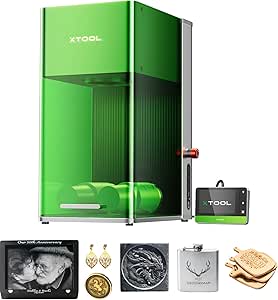
The xTool F1 is a compact dual-laser engraving machine designed for rapid personalization and marking across a wider variety of materials than a single-source engraver. It combines blue diode and infrared lasers in one enclosed desktop system.
It is less compelling for buyers unwilling to manage laser safety, ventilation and material compatibility. This guide evaluates suitability and purchase considerations; it does not claim WorthPeeks independently tested this unit. Manufacturer specifications, included accessories and app features can differ by region, generation or seller package, so verify the exact selected model before ordering.
Product overview and what it does
xTool equips the F1 with a 10W 455nm blue diode laser and a 2W 1064nm infrared laser. The two wavelengths have different material interactions: the blue laser handles many common engraving and light-cutting materials, while the infrared source expands marking capability to suitable metals and plastics. xTool specifies processing speeds up to 4000 mm/s and a working area of approximately 115 by 115 mm. Auto and manual focusing options help position the laser correctly for the material being processed. The machine's protective enclosure surrounds the working area, while a built-in fan and smoke outlet can connect to compatible extraction equipment. Wi-Fi and USB provide supported computer connectivity.
In practical terms, the xTool F1 dual-laser portable engraver trades some simplicity for a specialized set of capabilities. That trade-off can be worthwhile when you use its defining function frequently, but less attractive when a simpler device would meet the same need. Think about setup time, compatibility, storage, routine upkeep and any ongoing fees as part of the product itself, rather than as surprises after delivery.
How it works in everyday use
A realistic setup and first-use workflow
Identify the exact material, confirm it is approved for the machine and select the correct laser and settings in the supported software. Secure the workpiece, establish the correct focus and run a small test on scrap material. Operate only with the required protective enclosure, eye protection and fume controls described by the manufacturer.
Care, storage and repeat use
Clean optics and the working area only as instructed, remove debris after jobs and inspect protective components before use. Maintain extraction or filtration equipment and dispose of residues safely. Keep the machine away from children and never bypass safety interlocks.
Before deciding, imagine using the xTool F1 dual-laser portable engraver on a rushed weekday. How many steps are needed before it is ready, and how much attention will it require while operating? A feature that saves effort once a month may be less valuable than dependable controls that work every day. If other people will use the device, consider whether they can operate it safely without a lengthy explanation.
Main features explained
Core capability and the result it delivers
Dual-laser system combines a 10W 455nm blue diode source with a 2W 1064nm infrared source.
The useful question is how this feature changes a normal session with the xTool F1 dual-laser portable engraver. Consider the surrounding conditions and what you must do to get the claimed benefit. A technical specification alone does not establish that the same result will occur for every person, room, surface or task.
How the performance claim should be interpreted
Different laser wavelengths broaden the range of compatible engraving and marking materials.
Compare the stated measurement conditions before ranking competing products. Maximum, enhanced, theoretical and nominal values can describe very different things. Look for official test notes and distinguish the specification of the complete system from the performance of one component.
Controls and connected functions
Maximum processing speed is specified at up to 4000 mm/s.
A connected feature is valuable only if it works with your devices and remains convenient after setup. Check current app support, operating-system requirements, account permissions and whether essential functions remain accessible when connectivity is unavailable.
Physical design and everyday handling
Working area is approximately 115 by 115 mm according to xTool's product specifications.
Physical convenience often determines long-term satisfaction. Consider where the unit will sit, how you will carry or position it, which parts need cleaning and whether cables, charging equipment or accessories add clutter to the intended space.
Supporting features and accessories
Automatic and manual focusing options help set the correct laser focus for the workpiece.
Check the box contents against the retailer’s selected configuration. Images sometimes show optional accessories or another generation. If an add-on is essential, include its cost and availability in your comparison before choosing the product.
Compatibility and real-world operating limits
Protective enclosure surrounds the laser working area during operation.
Compatibility is not a small detail: a feature can be technically present yet unsuitable for a particular material, environment, device or person. Review the latest instructions, safety exclusions and regional limitations rather than relying only on a promotional headline.
The details worth checking on the exact model
Wi-Fi and USB connectivity support compatible xTool software workflows.
Look for the exact model number and supporting documentation. Product families often share similar names while differing in hardware, bundled parts, software support or warranties. Verify the version that will actually ship to your address.
Practical uses and real-world scenarios
Personalized metal tags
Check whether the chosen metal and surface finish are compatible with the infrared marking mode and test a small sample.
Small gift production
Plan fixtures, repeatable alignment, ventilation and finishing time rather than judging productivity only by maximum scanning speed.
Craft workshop experiments
Maintain a written material approval list and never process mystery coatings or plastics without verifying composition.
The F1 can be used for personalized gifts, small-business product marking, craft projects, tags, jewelry and other compatible small objects. Its speed and portable form factor can also suit live personalization or retail-style workflows where items are engraved individually.
These scenarios illustrate the difference between possible uses and sensible purchases. If the task happens rarely, borrowing, renting or choosing a simpler alternative may be economical. If it is part of a regular routine, consistent setup, reliability and maintenance matter more than a single impressive demonstration. Evaluate the complete workflow from preparation to cleanup.
Who it is best suited for
Well suited to makers and small businesses needing a compact engraver that can work across materials requiring either blue-diode or infrared laser processing.
The clearest fit is makers and small businesses wanting compact marking across compatible materials. This buyer can provide the required operating conditions and will benefit often enough to justify the purchase. They are also prepared to follow the manufacturer’s instructions, maintain the equipment and account for accessories or services that may be necessary.
On the other hand, buyers unwilling to manage laser safety, ventilation and material compatibility should consider a different category or a simpler product. List your three essential requirements before comparing retailers: the result you need, the constraints of your environment and the total cost you are comfortable paying. If the product fails one of those tests, an attractive discount will not fix the mismatch.
How it compares with alternatives
Closest alternatives and trade-offs
A diode-only hobby laser may cost less but have different material limitations. A larger enclosed desktop machine may offer more workspace and integrated extraction at the expense of portability. The F1 combines blue diode and infrared laser sources, but neither wavelength is suitable for every material.
Total cost and ownership convenience
Compare the xTool F1 dual-laser portable engraver with at least one simpler option and one more specialized alternative. Include replacement parts, subscriptions where applicable, accessories, charging or power arrangements, storage and service availability. The least expensive purchase is not always the lowest-cost ownership experience; equally, a premium product is not automatically the right choice for occasional use.
Comparison pages can blur differences between generations and bundles. Use the same conditions for each candidate: actual model number, supported functions, measurement method, warranty region and included accessories. Give extra weight to the criteria you will encounter repeatedly, such as comfort, cleanup, portability, compatibility and dependable performance.
Limitations and things to verify before buying
Material compatibility and safe laser settings must be confirmed before processing. Some materials can release hazardous fumes and should never be laser engraved. Appropriate ventilation or extraction is essential, and users should follow xTool's enclosure, fire-safety and material guidance. The relatively compact work area also limits the size of standard projects.
Laser engraving can cause eye injury, burns, fire and hazardous fumes. Never engrave unknown plastics, PVC or other prohibited materials; some release dangerous gases. Laser safety cannot be established from a product listing alone: follow the exact machine manual, local regulations and enclosure requirements.
Read the current manufacturer manual for operating restrictions and the seller listing for the exact configuration. Product information may change after publication, including software support, subscription conditions, service terms and accessories. If a safety-critical or essential feature cannot be verified, do not infer it from photographs or from a different model in the same family.
Practical pre-purchase checklist
- Confirm the exact xTool F1 dual-laser portable engraver model, generation and selected retailer bundle.
- Check that the main function addresses a problem you encounter regularly.
- Verify operating conditions, compatibility and safety exclusions in the current manual.
- Identify subscriptions, software requirements, accessories and consumables.
- Measure the available setup and storage space and consider routine cleanup.
- Check warranty coverage, seller return terms, repair options and replacement parts.
- Compare a simpler alternative and calculate the full ownership cost.
Keep this list open while reviewing the live product page. A missing accessory, unsupported region or inconvenient operating requirement can matter more than a modest difference in price. When a marketing claim appears unusually broad, look for the conditions under which it was measured.
Frequently asked questions
Can it engrave every material?
No. Laser wavelength, coating and material chemistry determine compatibility and safety.
Does dual-laser mean two lasers fire at once?
Not necessarily. Confirm how the exact software and hardware select and operate each source.
Can I engrave PVC?
Do not engrave PVC or other prohibited chlorine-containing materials; hazardous fumes can result.
Is it safe to operate without an enclosure?
Follow the manufacturer’s protective enclosure, eye protection and ventilation requirements; do not bypass safeguards.
Is it suitable for a small business?
Potentially, when materials, workflow, safety controls and production volume justify the investment.
Final buying advice
The xTool F1 dual-laser portable engraver can be a worthwhile purchase when its defining capability solves a real, recurring problem and its ownership requirements fit your routine. The strongest reason to buy is not that it has the most features, but that you can use those features safely and consistently. If setup, compatibility, upkeep or ongoing cost is a poor fit, choose an alternative that better matches the job.
Before checkout, verify the exact model, included accessories, current manufacturer guidance, warranty and retailer details. WorthPeeks may earn a commission from qualifying purchases through affiliate links on this page at no additional cost to you. Prices, availability and seller options are controlled by the retailer.
Ready to check this product? See the current listing, availability and seller details before deciding.
Check on Amazon →
Affiliate disclosure: WorthPeeks may earn a commission from qualifying purchases, at no extra cost to you.