Quick verdict: who should consider it?
The Garmin Approach R10 portable golf launch monitor is most useful for golfers who want feedback on practice shots at a range or compatible indoor setup. It is not simply a question of whether the product has an attractive feature list: consider how often you will use it, where it will live, and whether its operating conditions match your actual needs. A product that solves a repeated problem is usually a better buy than one purchased for a single impressive demonstration.
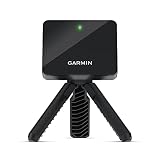
The Garmin Approach R10 is a portable radar-based golf launch monitor designed for practice at home, indoors or at the driving range. It connects with the Garmin Golf app to turn individual shots into measurable performance data.
It may be a poor fit for buyers expecting professional-grade accuracy in every environment without careful alignment. This WorthPeeks article is an informational buying guide, not a claim that our team independently tested the device. Where manufacturer ratings, product variants or seller packages differ, confirm the exact version before checkout. Start with the work you want the product to do, then judge the specifications against that use case.
Product overview and what it does
Garmin designed the Approach R10 to measure more than a dozen golf metrics, including club-head speed, ball speed, swing tempo, launch angle, launch direction, carry distance and other calculated or measured values. When paired with a compatible smartphone and the Garmin Golf app, Training Mode helps golfers review shot patterns and club statistics. The system can also automatically record video clips of swings for later analysis. For users building an indoor or backyard simulator setup, the R10 supports Home Tee Hero with an eligible subscription and is compatible with selected third-party simulator software. Its compact radar unit, tripod and phone-mount workflow make it substantially easier to transport than a permanently installed launch-monitor system.
The key buying distinction is between what the Garmin Approach R10 portable golf launch monitor is designed to do and what it can reliably do under your conditions. Setup space, compatible accessories, the environment and user technique can all affect results. Product listings can combine marketing language with technical specifications, so look for model numbers and stated test conditions rather than assuming every claim applies in all circumstances.
How it works in everyday use
Getting started with a realistic workflow
Place the radar unit according to Garmin’s prescribed distance and alignment requirements, then pair it with a compatible phone and app. Use a safe hitting area and check that the ball flight or indoor net arrangement meets the manual’s requirements. Review a series of shots rather than overinterpreting one reading.
Maintenance and storage after use
Charge the monitor before a session, keep the radar face clean and protect the unit from impact and rain beyond its rating. Check firmware and app compatibility. Indoors, the available space behind the ball and the target area matter as much as the launch monitor itself.
Before buying, walk through an ordinary week. Decide where the equipment will be stored, who will prepare it, how much time cleanup will take and whether other people in the household need to learn the controls. If a product is awkward to retrieve or requires extra purchases for every session, its practical value can be lower than the feature list suggests.
Main features explained
Primary operating capability
Radar-based measurement technology tracks golf shots from a compact portable unit.
Consider the conditions needed to obtain this result with the Garmin Approach R10 portable golf launch monitor. A headline number may describe a maximum, a laboratory test or a particular setting, rather than every ordinary session. Compare the stated test method and the limitations in the official manual before giving this feature too much weight.
Performance ratings in context
Provides more than a dozen metrics including club-head speed, ball speed, launch angle and carry distance.
Ask whether this function reduces effort on the jobs you actually perform. The most useful benefit is not necessarily the most dramatic specification: predictable setup, repeatable performance and manageable cleanup often determine whether a product earns a permanent place in a routine.
Controls and setup
Pairs with the Garmin Golf app for shot data, training information and session review.
Check whether the capability depends on an accessory, consumable, software feature or selected model option. The product photograph may show a configuration different from the one currently selected by the retailer. Verify what is included before calculating value.
Design and practical handling
Training Mode helps users examine shot dispersion and performance with different clubs.
Consider the conditions needed to obtain this result with the Garmin Approach R10 portable golf launch monitor. A headline number may describe a maximum, a laboratory test or a particular setting, rather than every ordinary session. Compare the stated test method and the limitations in the official manual before giving this feature too much weight.
Supporting functions and accessories
Automatic video recording can capture swing clips when used with a compatible smartphone.
Ask whether this function reduces effort on the jobs you actually perform. The most useful benefit is not necessarily the most dramatic specification: predictable setup, repeatable performance and manageable cleanup often determine whether a product earns a permanent place in a routine.
Compatibility and operating limits
Supports Home Tee Hero virtual golf with an active qualifying subscription.
Check whether the capability depends on an accessory, consumable, software feature or selected model option. The product photograph may show a configuration different from the one currently selected by the retailer. Verify what is included before calculating value.
What the specifications really mean
Rechargeable internal battery provides up to 10 hours of use according to Garmin.
Consider the conditions needed to obtain this result with the Garmin Approach R10 portable golf launch monitor. A headline number may describe a maximum, a laboratory test or a particular setting, rather than every ordinary session. Compare the stated test method and the limitations in the official manual before giving this feature too much weight.
Practical uses and real-world scenarios
Driving-range session
Set the monitor on a stable surface, align it with the target and compare groups of shots with the same club. Trends in dispersion may be more useful than chasing one unusually long carry number.
Garage net practice
Measure the required space and ensure a safe impact screen or net. The device needs a suitable radar environment; a cramped setup can produce poor results or safety risks.
Tracking a training plan
Record consistent sessions with the same clubs and similar conditions. Improvement is easier to judge across repeated practice than from a single session with changing weather and range balls.
The Approach R10 can be used on a driving range to measure practice sessions, at home with a suitable hitting setup, or as part of a compatible indoor golf simulator. Recorded metrics and video can help users compare changes in their swing or equipment over repeated sessions.
These examples illustrate why intended use matters. An occasional task may be handled adequately by a cheaper or rented alternative; a weekly task may justify the convenience of dedicated equipment. Compare how much preparation, supervision and cleanup each scenario needs. Also consider the consequences of using the device on an unsuitable surface, ingredient, vehicle, person or environment.
Who it is best suited for
Suitable for golfers who want portable launch-monitor data and simulator functionality without installing a fixed professional launch-monitor system.
The strongest candidate is golfers who want feedback on practice shots at a range or compatible indoor setup. They can accommodate the operating requirements and understand the difference between normal upkeep and a defect. They should be willing to consult the manual, follow relevant safety guidance and make room for the device or its accessories. A sensible buyer also checks whether the product fits existing equipment and whether service is available locally.
It is harder to recommend to buyers expecting professional-grade accuracy in every environment without careful alignment. If one essential condition is missing, a different product category may be more suitable. Write down three non-negotiable requirements before comparing prices: the job it must accomplish, the conditions in which it must work and the effort you are willing to spend maintaining it.
How it compares with alternatives
The closest alternatives and their trade-offs
A premium launch monitor can offer more direct measurement or additional data but at a substantially higher cost. The R10 is attractive as a portable practice tool, especially for trend tracking. Compared with a simple swing video, it supplies shot metrics, but video may show body movement and technique that radar alone cannot diagnose.
Compare total ownership rather than the sticker price
For the Garmin Approach R10 portable golf launch monitor, compare the exact model with at least one simpler alternative and one more specialized option. Include consumables, power sources, compatible accessories, subscriptions where relevant, storage space and repairability. A low initial price is less attractive if essential parts must be purchased separately or routine use is unnecessarily complicated.
Read comparison claims carefully: products in the same category may use different measurement methods, regional configurations or package contents. A feature that looks stronger on paper is not necessarily the most valuable for a short, occasional task. Prefer specifications that connect directly to your actual use, and verify them against current manufacturer documentation.
Limitations and things to verify before buying
The R10 requires correct positioning and sufficient space between the device, ball and net or target area. Some simulator features require subscriptions or third-party software. Garmin states that a compatible smartphone with the Garmin Golf app is required for the broader connected feature set.
Radar measurements depend on setup, environment and available ball flight. Indoor readings can be less dependable if distances or alignment are wrong. Some simulator courses or features may require subscriptions or third-party software; verify current app entitlements before buying.
Another limitation is that product listings can change after an article is published. The selected bundle, accessories, availability and warranty may differ by region or seller. Check the current manufacturer instructions for safety-critical procedures and the retailer listing for exactly what arrives in the box. If you cannot confirm a feature that is essential to your use case, do not assume it is included.
Practical pre-purchase checklist
- Confirm the exact Garmin Approach R10 portable golf launch monitor model and seller-selected configuration.
- Check compatibility with the intended environment, materials, vehicle or equipment.
- Identify accessories, consumables, power supplies or subscriptions sold separately.
- Review operating limits and the latest manufacturer safety instructions.
- Confirm the space needed for setup, storage and maintenance.
- Compare seller warranty, service availability, return policy and replacement parts.
- Calculate realistic ownership cost and compare a simpler alternative.
Keep this checklist available when reviewing the live retailer listing. A missing adapter, incompatible material or unsupported operating condition can outweigh a small price difference. If a claim seems unusually broad, look for the exact test conditions and exclusions before making a purchase decision.
Frequently asked questions
Does it work indoors?
It can be used indoors when the space, setup and safety requirements are met.
Is it as accurate as a professional launch monitor?
Do not assume identical performance; accuracy depends on the metric, setup and environment.
Does it need a phone?
A compatible mobile device and Garmin software are part of many workflows; verify current requirements.
Are simulator features free?
Some services may require subscriptions or separate licenses; check current Garmin terms.
Can it improve my swing automatically?
It provides feedback, but interpreting and applying that data still requires practice or coaching.
Final buying advice
The Garmin Approach R10 portable golf launch monitor is worth considering when its core function solves a regular problem and its operating limits fit your circumstances. Prioritize repeatable usefulness over the most eye-catching specification. If the maintenance, setup and ownership requirements are realistic for you, the product may offer worthwhile convenience. If not, a simpler or more specialized alternative may be the better investment.
Before ordering, verify the exact model, package contents, current retailer details and manufacturer safety guidance. WorthPeeks may earn a commission from qualifying purchases through affiliate links on this page, at no additional cost to you. Pricing and availability are controlled by the retailer, not by this buying guide.
Ready to check this product? See the current listing, availability and seller details before deciding.
Check on Amazon →
Affiliate disclosure: WorthPeeks may earn a commission from qualifying purchases, at no extra cost to you.